
Centricular

Expertise, Straight from the Source


« Back

Devlog

Posts tagged with #tvos

GStreamer's VideoToolbox-based decoder for macOS, iOS, and tvOS (vtdec) has recently gained support for decoding HEVC video with an alpha channel.

No special setup is required. When vtdec detects an HEVC+Alpha stream, it automatically negotiates an output format with alpha where possible. Existing pipelines should work without changes - if a non-alpha output format is selected, the alpha channel is replaced with a black background.

You can try it out yourself! Download this HEVC+Alpha sample file and run the following pipeline:

gst-launch-1.0 videotestsrc ! video/x-raw,width=1280,height=720 ! compositor name=comp ! autovideosink \
               filesrc location="phone-hevc-alpha.mp4" ! parsebin ! vtdec ! comp.

The sample video shows a phone rendered with a transparent background. In this pipeline, that background is replaced with the default videotestsrc SMPTE color bars. It should look something like this:
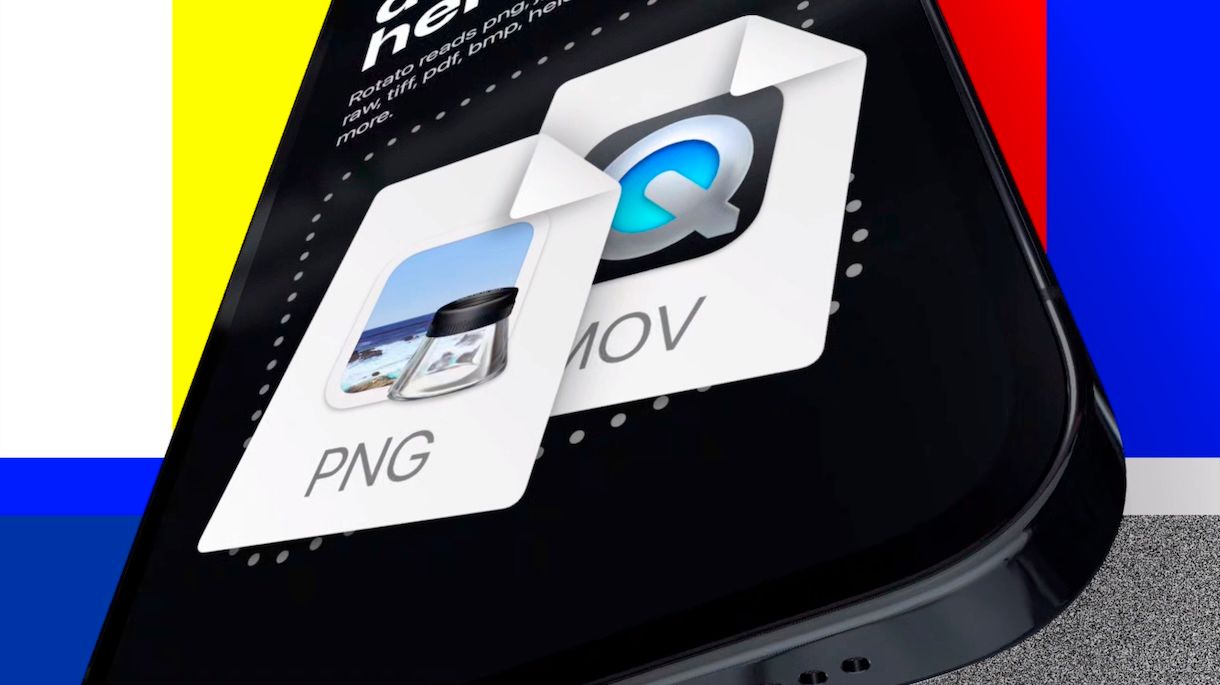
preview

This functionality opens up simpler compositing workflows. You can place HEVC+Alpha assets like this one on top of other content for overlays or effects without needing extra processing like chroma keying.

It's worth noting that another codec for videos with an alpha channel - VP8/VP9+Alpha - is also well supported in GStreamer via our libvpx, VA-API, V4L2 and D3D12 decoders.

If you need to encode your own HEVC+Alpha assets on macOS, you can already do so using vtenc_h265a, which we added to GStreamer a while ago.

HEVC with Alpha decoding via vtdec will be available in the upcoming GStreamer 1.29.2 development snapshot - feel free to give it a go and let us know if you encounter any problems.


We've been hard at work doing numerous small and large improvements to GStreamer for people who want to target Apple platforms: macOS, iOS, and tvOS.

iOS ARM64 Simulator Support via an XCFramework

With the GStreamer 1.28.0 release, the project now releases an XCFramework for iOS. As expected, this XCFramework supports iOS arm64, iOS Simulator x86_64, and iOS Simulator arm64. The legacy iOS framework that lipo-ed iOS arm64 and iOS Simulator x86_64 is now deprecated, and will be removed in a future release.

You can download the XCFramework from the official download page.

Thanks to Amy for helping me with this!

tvOS Support

As of version 1.28.1, GStreamer officially supports tvOS, and binaries for it are shipped as part of the iOS XCFramework. This means that the GStreamer 1.28.1 iOS XCFramework contains: ios-arm64, ios-arm64_x86_64-simulator, tvos-arm64, tvos-arm64_x86_64-simulator.

Most of the relevant Apple-specific plugins are supported:

  • osxaudio: Audio source/sink, using CoreAudio
  • atdec: Audio decoder, using AudioToolbox
  • atenc: Audio encoder, using AudioToolbox
  • vtdec: Video decoder, using VideoToolbox
  • vtenc: Video encoder, using VideoToolbox
  • glimagesink: Deprecated EAGL video sink
  • vulkansink: Metal-based video sink, using MoltenVK
  • vulkancolorconvert: Metal-accelerated video conversion, using MoltenVK
  • vulkanoverlaycompositor: Metal-accelerated video overlay compositor, using MoltenVK
  • ... more Metal/Vulkan elements

Two elements that use AVCaptureDevice had to be disabled because they need more work to support tvOS:

  • avfvideosrc: Video capture source, using AVFoundation
  • avfdeviceprovider: Video capture device provider, using AVFoundation

Thanks to Remote Studio for sponsoring this work!

Improved support for using Rust plugins on Apple platforms

Linking more than one Rust plugin into your app had been broken on macOS and iOS for some time. The fix for that requires prelinking, which Amy has written about previously, but it couldn't be enabled on macOS due to some LLVM/LLD issues. We had to wait for the fixes to percolate down to a Rust toolchain release. That finally happened in Rust 1.93, but by that time a new problem had cropped up: Xcode 26.

Due to some toolchain changes in Xcode 26, linking Rust plugins was failing on macOS and also on iOS with the legacy framework. After weighing all the options, the best solution was to add -no_compact_unwind to the linker flags on macOS, and direct people to use the XCFramework when using Rust plugins on iOS.

This is now added automatically if you use pkg-config (using CMake or Meson, for example), but if you're using a plain Xcode project, you need to add -no_compact_unwind manually to linker flags in Xcode.

This fix will be available in the upcoming 1.28.3 release.

Many more macOS, iOS, tvOS improvements

Contributors have been hard at work with small and large improvements to the Apple-specific elements in GStreamer. Ranging from AV1 and VP9 decoding support in vtdec to better debug info, bugfixes, memory leak fixes, crash fixes, and much more. The patches are too many to list or even link!